Learning Center quick reference guide
Resource | Last updated: 5/8/2026 | Learn how best to use Learning Center resources
The 84.51° Prism Learning Center is designed to provide you with all the resources and tools needed to enhance your skills and knowledge of 84.51° Prism. Whether you’re a new user or an experienced one, you'll find valuable information to help you succeed.
This quick reference guide highlights the information found in each major section of the Learning Center and how to best use those resources to maximize your Learning Center experience.
Navigate the Learning Center
Left-hand navigation menu
The left-hand navigation menu is your structured map through the Learning Center providing an organized list of sections and topics, so you can navigate efficiently without having to search or scroll extensively.
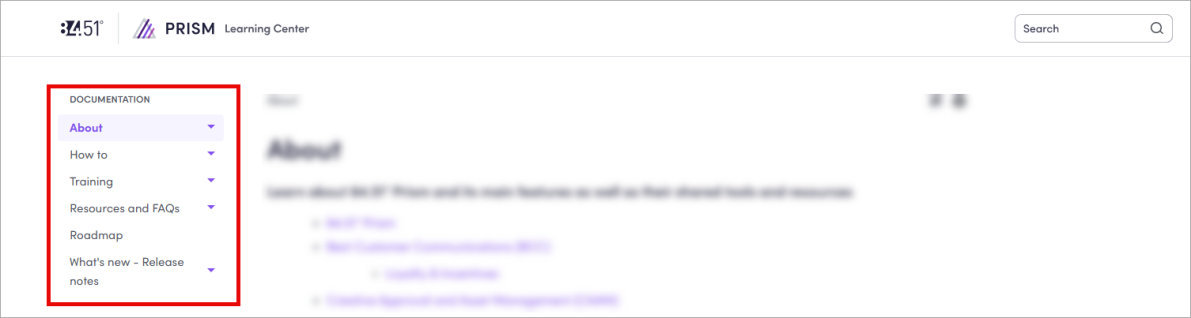
You can use the left-hand navigation menu to quickly find and access the information you need from any page in the Learning Center.
Right-hand navigation menu
The right-hand navigation menu is the quick-access map for a Learning Center page, helping you efficiently jump to different sections without scrolling endlessly.
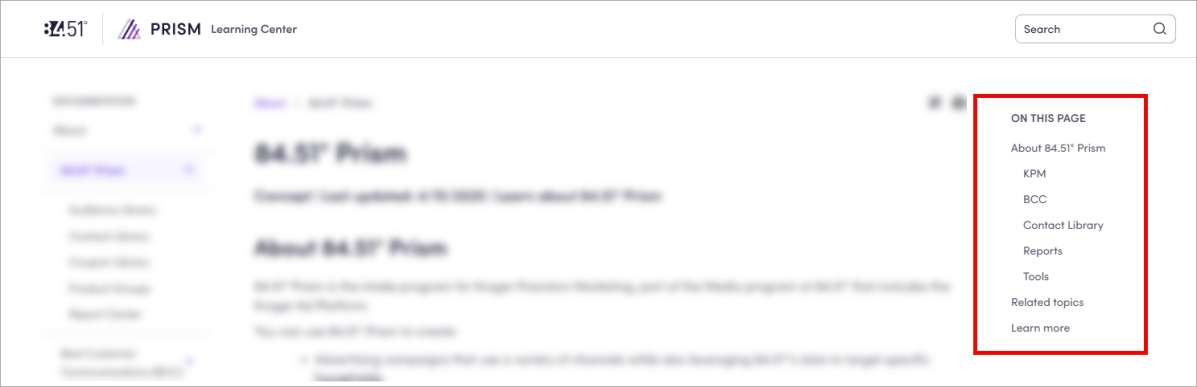
Instead of hunting for relevant content, you can scan the right-hand navigation menu and click on what you need, like the digital equivalent of skimming chapter titles in a book to find the section you want.
Search bar
Located on the Home page or on any topic in the Learning Center, you can use the search bar to quickly find topics, guides, and resources.

Still can't find what you need or have a suggestion for the Learning Center? Submit your feedback via the Service Desk.
Toolbar
The toolbar on each topic in the Learning Center provides essential functions to enhance your experience while interacting with content.

Remove Highlights ( ) allows you to clear any previously added highlights from the results of a search, making it easier to reset afterward.
About
When you click the About card from the Home page, it takes you to the About section of the 84.51° Prism Learning Center, where you’ll find information about key features and functionality, like:
|
Topic |
Description |
|---|---|
|
The platform used for creating and managing highly targeted advertising campaigns using Kroger's customer data |
|
|
Leverages 84.51°'s data to connect brands with Kroger shoppers for targeted household reach |
|
|
Focuses on rewarding Kroger's most loyal customers with personalized offers to drive visits, units, and sales |
|
|
Created and curated by Kroger, these multiple nominations and coupons from various companies reward loyal customers and drive sales by offering personalized deals |
|
|
The central hub for creating and managing the creative aspects for some Managed Service and Incentives Campaigns |
|
|
The central repository for managing contacts used in 84.51° Prism campaigns |
|
|
The centralized location to monitor the performance of various 84.51° Prism campaigns |
|
|
The collection of Audience Segments, including Custom and Pre-Built Segment options, used for targeting campaigns |
|
|
A core feature within 84.51° Prism for audience segmentation and campaign targeting |
|
|
The central repository for managing coupons used in 84.51° Prism campaigns |
How-to
When you click the How-to card from the Home page, it takes you to the How-to section of the 84.51° Prism Learning Center, where you’ll find step-by-step guides to help you master 84.51° Prism features and functionality.
Specifically, the topics are organized by task to help you quickly find what it is you need to do.
|
Topic |
Task |
Description |
|---|---|---|
|
Kroger Precision Marketing (KPM Kroger Precision Marketing) Managed Service |
Outlines the step-by-step process for creating and submitting Managed Service Campaigns You can also find instructions on how to create each Managed Service channel in their own topic. For a full list of channels and instructions, see Managed Service Campaigns. |
|
| Modify Campaigns |
Provides straightforward instructions for duplicating and deleting Managed Service Campaigns |
|
| View Managed Service Campaign performance |
Provides a structured approach to viewing and analyzing Managed Service Campaign performance |
|
|
Incentives |
Outlines the step-by-step guide to participating in Best Customer Communications (BCC Best Customer Communications) events |
|
| Modify nominations |
Provides instructions for modifying (editing, deleting, and withdrawing) Best Customer Communications (BCC) nominations |
|
| View Incentives Campaign performance |
Provides a comprehensive guide to viewing and analyzing Best Customer Communications (BCC) Campaign performance |
|
| Edit Yearly Plan |
Provides instructions on how to edit and manage your Best Customer Communications (BCC) Yearly Plan |
|
|
Creative Approval and Asset Management (CAAM Creative Approval and Asset Management) system |
Use the CAAM Coupon and Ad Builders |
Outlines the steps for building and submitting coupons and ads for Managed Service and Incentives Campaigns |
|
Provides instructions on how to use the CAAM Asset Library for building coupons and ads for Managed Service and Incentives Campaigns |
||
|
Product Groups |
Outlines the step-by-step instructions for all key Product Group actions |
|
|
Audience Segments |
Provides a comprehensive guide to using Audience Segments |
|
|
Contact Library |
Provides clear instructions for all key contact management actions |
|
|
Coupon Library |
Provides a comprehensive guide to coupon creation and management |
Training
When you click the Training card from the Home page, it takes you to the Training section of the 84.51° Prism Learning Center, where you’ll find opportunities to sign-up for live, webinar-based training sessions and access to recorded sessions on key 84.51° Prism features and processes.
Led by experts, these sessions include:
-
84.51° Prism 101 — Covers the features of 84.51° Prism including an overview of Kroger Precision Marketing (KPM) Managed Service and Incentives Campaigns.
Resources and FAQs
When you click the Resources and FAQs Frequently Asked Question card from the Home page, it takes you to the Resources and FAQs section of the 84.51° Prism Learning Center, where you’ll find information on how to get help and troubleshoot issues in 84.51° Prism.
The Learning Center is your best option for 84.51° Prism support as it offers how-to instructions, video tutorials, information about key concepts and methodology, helpful resources, FAQs, and release notes.
If further information and support is needed, contact the Service Desk by emailing service.desk@8451.com.
You should thoroughly troubleshoot issues before contacting support can expedite the resolution process. When contacting support, provide detailed information for efficient problem-solving. To learn more, see Technical Support.
In the Resources and FAQs section, you’ll also find these guides to help you get started with the platform and its key features and functions:
Roadmap
When you click the Roadmap card from the Home page, it takes you to the Roadmap, you’ll find current and future developments for 84.51° Prism, which provide insight into the direction of 84.51° Prism.
You should refer to the Roadmap for a general understanding of planned enhancements but should not rely on specific dates or functionality being guaranteed.
Release Notes
When you click the Release Notes card from the Home page, it takes you to Release Notes, where you’ll find past and present 84.51° Prism releases.
You should visit this page frequently to see the latest information on new features, enhancements, and fixes.
 Go to
Go to