Kroger Precision Marketing (KPM) Managed Service
Concept | Last updated: 5/8/2026 | Learn about Kroger Precision Marketing and Managed Service Campaigns
Kroger Precision Marketing (KPM Kroger Precision Marketing) is the overarching retail media business of Kroger designed to make brand advertising more effective by closing the loop between media exposure and in-store sales. Powered by 84.51° data science, KPM leverages Kroger’s first-party data to find the right customers across their purchase journey, both Onsite (for example, Brand Shops and Push Notifications) and Offsite (for example, Programmatic CTV and Meta).
Managed Service Campaigns are the key offering within KPM that provides a full-service, data-driven approach to Campaign execution and measurement across these Kroger’s digital and physical properties.
By doing so, KPM and Managed Service Campaigns:
-
Reach the right shoppers with first-party purchase insights.
-
Seamlessly connect shoppers to buy brands.
-
Verify business impact with Kroger sales insights.
These actions are achieved using 84.51° Prism along with other 84.51° solutions like the Kroger Ad Platform.
You can learn more about KPM and these solutions on the Kroger Precision Marketing website.
Leveraging Kroger Precision Marketing (KPM)’s expertise, data, and technology, Managed Service Campaign are created and implemented with the help of an Account Management team.
Managed Service Campaigns benefit from an integrated KPM ecosystem connecting digital and in-store touchpoints. This integration allows for omni-channel Campaign execution and measurement.
Managed Service channels
A channel is the medium in which the ad or offer is delivered to customers. For example, a Display Ad is an ad embedded within a non-Kroger Owned and Operated Page, while an Email Module delivers your deal to customers with a larger, Kroger-sent email.
These channels* can be setup as individual or Cross-Channel Campaigns.
To learn how, see Create a Managed Service Campaign.
Brand Shop and Meta Ads cannot be included with other channels for a Cross-Channel Campaign.
|
|
Channel |
Description |
|---|---|---|
|
Onsite |
Brand Shop |
|
|
Email Module |
|
|
|
Premium Placement |
|
|
|
Push Notification |
|
|
|
Single Subject Email |
|
|
|
Offsite |
Custom Influencer |
|
|
Display Ad |
|
|
|
Meta |
|
|
|
Online Video |
|
|
|
|
|
|
|
Programmatic Audio |
|
|
|
Programmatic CTV |
|
|
|
Snapchat |
|
|
|
Incentives |
Targeted Digital Coupon |
|
Campaign dashboard
Individual Campaign dashboards provide a visual snapshot of your Managed Service Campaign data and information in 84.51° Prism.
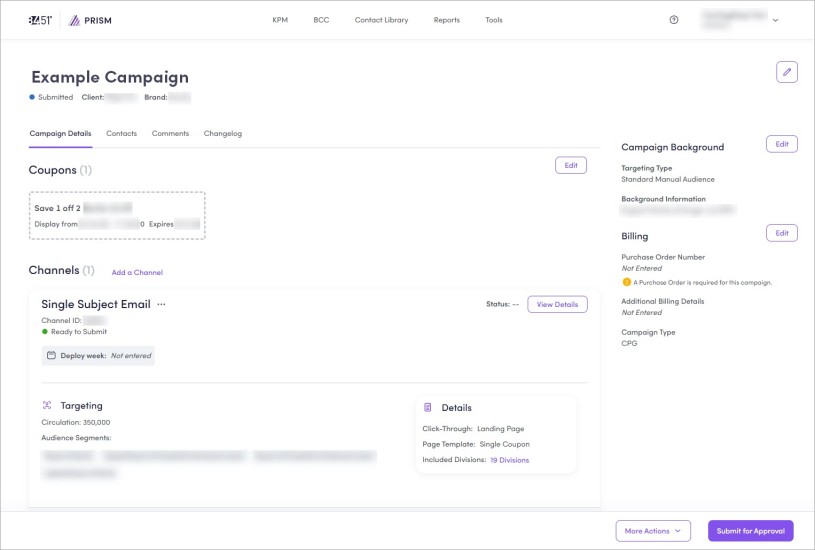
Each tab of the dashboard has a specific function or feature:
-
Campaign Details — Shows an overall summary of your channel(s).
You'll enter and/or update your channel details in this tab. For full instructions for each channel, see Managed Service Campaigns.
-
Contacts — Shows contacts and roles for your Campaign.
You'll modify your contacts in this tab. To learn how, see Modify Contacts.
-
Comments — Shows any Campaign information that doesn't fit into any other category.
For example, you can add anything you'd like reflected on Campaign briefs like additional legal language. To learn how, see Add Comments.
-
Changelog — Shows any changes made to your Campaign and who performed those changes.
Only changes made after 12/09/2021 are shown.
Helpful resources
Check out these helpful resources to further aid you in your work:
-
Kroger Precision Marketing - Creative Specs and Policy Documents
-
KPM Influencer Guidelines (for any existing Influencer content)
-
KPM Custom Influencer Guidelines (for new Influencer content)
Related topics
Want to learn more about this topic? See these related topics:
Learn more
Explore other sections in the Learning Center to learn more about 84.51° Prism:
 Go to
Go to