Product Groups
Concept | Last updated: 6/8/2026 | Learn about Product Groups and the Product Group creator
Product Groups are collections of UPCs Universal Product Codes (like most frequently used or similar UPCs Universal Product Code) within 84.51° Prism. These collections can then be used in your Campaigns and coupons.
You can use Product Groups to:
-
Target specific shoppers.
-
Perform measurements.
Dashboard
After logging into 84.51° Prism, you'll see the main 84.51° Prism dashboard. From there, you can navigate to the Product Groups dashboard.
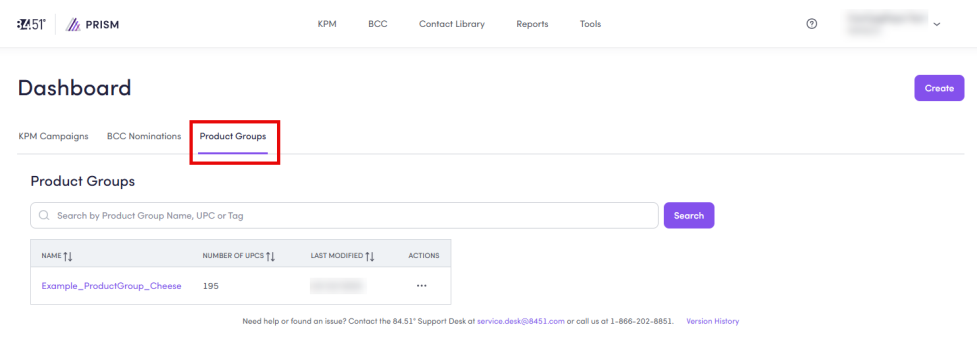
In the Product Groups dashboard, you can see all the Product Groups you've created as well as those shared with you.
Use the search bar to search for specific Product Groups by Product Group Name, UPC, or Tag.
From here, you can also modify (view and copy UPCs, edit, and delete) Product Groups.
To learn how, see Create and modify Product Groups.
Product Group Creator
From Tools, you can navigate to the Product Group Creator to create your Product Groups.
To learn how, see Create and modify Product Groups.
Related topics
Want to learn more about this topic? See these related topics:
Learn more
Explore other sections in the Learning Center to learn more about 84.51° Prism:
 Go to
Go to