Incentives FAQs
Resource | Last updated: 9/25/2026 | Find answers to the most frequently asked Incentives questions
Contacts
How do I add contacts to my nomination?
Every Incentives Campaign must have contact information before you can submit it for approval.
To learn how to add contacts, see Modify Contacts
To learn more about these contacts, see Contact Library and Use the Contact Library.
Coupons
What is the Coupon Library?
The Coupon Library is the place where created and finalized coupons are stored so that they can be reused in your Campaigns.
To learn more, see Coupon Library.
Where can I create and manage coupons?
You can create and manage coupons in the Coupon Library. Coupons can be reused across multiple Campaigns or created directly within a Campaign.
How do I create a coupon?
In the Coupon Library, you can manage (create, edit, and delete coupons / variants) for your Incentives Campaigns.
To learn how, see Use the Coupon Library.
You can also create coupons directly in Incentives Campaigns.
To learn how, see Select Coupons to Nominate.
How do I add UPCs to a coupon?
During the coupon creation process, you'll can Add UPCs Universal Product Codes and select a method for adding UPCs Universal Product Code to the coupon.
For full instructions, see Add UPCs.
What are the Loyalty Events guidelines for new products and discount requirements?
Discount Requirements are based on the lowest retail selling price (RSP Retail Sale Price).
-
The discount is 15% off RSP for all offers under $10.
-
The discount is 10% off RSP for all offers greater than $10.
Other best practices for discounts are:
-
If the incentive is a multiple and the combined RSP is over $10, then the 10% rule applies.
-
The suggested incentive minimum discount floor is $0.40.
-
For items with an RSP of $1.00 or less, the minimum discount floor is $0.25.
-
Your discount value must end in an increment of $0.05.
Additionally, coupons should have products within the same commodity unless they are categorized incorrectly in the Kroger hierarchy.
Multiple supplier offers within Best Customer Communications (BCC Best Customer Communications) aren't allowed.
The requirements for new products varies depending on the type of Incentives Campaign:
|
|
|
|
|
What do I enter in the UPC field when creating a coupon?
You should enter the 13-digit UPC in the UPC field before validating the UPCs.
Do not add any descriptions of the UPCs.
What does Division Penetration mean?
Division Penetration shows where a product is broadly available across Kroger divisions. Eligible divisions appear in green, while grayed-out divisions may indicate limited distribution or insufficient data.
The UPCs entered and validated for your coupon are used to show the divisions where the products have over 70% distribution in the Division Penetration section.
Loyal Customer Mailers and MyMagazines target at a store level so it is okay to include divisions in your nomination that don’t have a green circle (that is over 70% distribution).
Can I add additional UPCs to my coupon?
Yes! You can add UPCs to the coupon at any time. However, after the event lock, you cannot update the targeting UPCs.
To learn how, see Edit a coupon.
You CANNOT remove UPCs from a coupon after it is created.
If you need to remove UPCs, contact your Incentives Account Manager.
How do I indicate the coupon includes products that contain dairy or other key Product Attributes?
As you enter UPC details for your coupon, there are Product Attribute selections you'll need to make, based on the coupon you are creating.
To indicate if any of the UPCs are Food that is Dairy (milk, yogurt, cheese), select that one.
Dairy products are considered to be:
-
Fluid milk (like fresh fluid milk, yogurt, buttermilk, flavored milk drinks, half and half, and cream)
-
Cheese (whether hard, soft, block, or shredded)
-
Condensed, evaporated, concentrated, dry, and storage milk
-
Ice cream, ice milk, ice cream mixes, frozen custards and other milk based frozen desserts
-
Iced coffee, if milk is listed in the first three (3) ingredients
To learn how, see Add UPCs.
Can I change the coupon wording on my offer?
Yes, you can make updates to the coupon including Item Description.
To learn how, see Edit a coupon.
However, after the coupon has been created, you are not able to change the offer amount. For example, if you have a “$1.00 off one” coupon, you are not able to change it to “$1.50 off one”.
Any desired change to the offer value, purchase requirements, or type of product being promoted would require a new coupon to be created.
How do I add coupons to my nomination?
After a coupon has been created and is in the Coupon Library, you can select it for your Incentives Campaigns.
To learn how, see Add coupon from your Coupon Library.
Targeted Digital Coupons
What is a Targeted Digital Coupon?
A Targeted Digital Coupon is delivered to a specific audience based on Campaign targeting criteria. These coupons allows you to reach the most relevant customers and measure Campaign performance.
To learn more, see Targeted Digital Coupon.
To learn how to create a Targeted Digital Coupon, see Create a Targeted Digital Coupon.
What is the difference between a Targeted Digital Coupon and a General Coupon Pool coupon?
Targeted Digital Coupon are delivered to selected customer audiences and include performance measurement (closed-loop measurement).
General Coupon Pool offers are available to all eligible customers and do not include targeted audience measurement.
What are the most common use cases for Targeted Digital Coupons?
Some of the most common use cases are:
-
New Item launches to drive trial and potential repeat.
-
Drive Sales Uplift and ROAS Return on Ad Spend.
-
Recapture Lapsed Households Households that have not bought the promoted product in the latest 26 weeks due to supply issues or seasonality.
-
Re-engage Households that purchased during a specific time or with an offer (like a Hot digital offer).
When should I amplify my Targeted Digital Coupon with Media?
When Targeted Digital Coupons are amplified with KPM Kroger Precision Marketing tactics, the Campaign drives an outsized impact. Households exposed to multiple Media channels in a Campaign drive 3X higher Sales Uplift.
What media tactics direct shoppers to a Targeted Digital Coupon?
Some tactics to drive shoppers to Targeted Digital Coupons are:
-
Single Subject Email — Communicate 1:1 with the most relevant customers and tailor creative to represent the Brand's message while leveraging Kroger's trusted brand equity and industry-leading open rates.
-
EMOD Email Module — Leverage high engagement rates of weekly Kroger emails to promote Brand-specific content, offers, or promotions as part of the larger, multi-subject email.
-
Push Notification — Short-form messaging drives shoppers to engage with your Brand's message or CTA Call to Action through the Kroger mobile app.
New at Kroger
What is a New at Kroger Campaign?
New at Kroger Campaigns help introduce new products to Kroger shoppers by increasing product awareness and encouraging trial.
To learn more, see New at Kroger.
Creative
How do I submit my creative for a Loyal Customer Mailer (LCM) event?
Once your offer has been approved in 84.51° Prism, you'll receive an automated email to start building your coupon in CAAM Creative Approval and Asset Management.
To learn how, see Use the CAAM Coupon and Ad Builders.
To see creative requirements, see Submit a creative.
If you do not have access to CAAM, contact your Incentives Account Manager or email loyalty&incentives@8451.com.
How do I submit my creative for a MyMagazine event?
Once your offer has been approved in 84.51° Prism, you'll receive an automated email to submit your art in the FTP.
To see creative requirements, see Submit a creative.
If you have any questions, contact your Incentives Account Manager or email loyalty&incentives@8451.com.
Nominations
Who else can see my nominations?
Your Incentives Account Manager as well as anyone with client access can see nominations for that client. Additionally, Anyone with client access can view and edit the nomination within 84.51° Prism.
If you'd like to request access for someone else in your organization, contact your Incentives Account Manager.
What do I name my nomination?
You should name your nominations using the following convention, Supplier_Brand(s)_Product Type (if applicable)_Pool (if applicable).
Some examples are:
-
Kroger_Simple Truth_Cookies Family Size_Pool
-
Kroger_Private Selection_Ice Cream
-
Kroger_Private Selection|Simple Truth_Snacks_Pool
Why can't I nominate my product (s) to an Event?
Products must meet specific eligibility requirements before they can participate in an Event. Moreover, once the nomination deadline has passed, 84.51° Prism no longer allows new nominations to be submitted.
If you have any questions, contact your Account Management Team for assistance.
Where can I view my nomination?
You can see your nominations on the BCC Events dashboard. Find the Event you nominated in and click it to view all of your nominations for that Event as well as the Event Milestones.
To learn more, see BCC.
Can I add notes to my nomination?
Yes. To add notes, find and select the nominated coupon where you want to add notes. Then, on the Coupon Details tab, scroll down to Notes and enter any notes you have about this nomination.
What happens when I click Submit for Approval?
Once you click Submit for Approval and complete the steps during the process, 84.51° Prism automatically begins to review and approve most BCC nominations.
Any Boost nominations are not eligible for auto-approval and must be reviewed by your Incentives Account Manager.
To learn more, see Submit for Approval.
What if I need to make changes to the nomination after it is Approved?
If there are changes to the nomination after the nomination has been approved, contact your Incentives Account Manager.
What is a pooled nomination?
If you nominate multiple coupons in one (1) Campaign, then you "pool" them together to create a pooled nomination.
Any Nomination that includes more than one (1) offer is considered a pool in 84.51° Prism
Some examples of these types of nominations include:
|
Type |
Description |
|---|---|
|
Offer Pool Nominations |
Uses 84.51°’s targeting science to determine the best allocation for each offer within the group of offers and the total maximum circulation to reach the most relevant households for each offer. |
|
Tiered Multiples |
|
|
Targeting |
Appropriate Multiples Offers are allocated to a household based on the number of units they purchase in a week’s time. |
|
Product Offer Pools |
|
Performance
Where can I find results for Incentives Campaigns?
Campaign performance is available through the BCC Performance dashboard in Report Center.
To learn how, see View Incentives Campaign performance.
Additional results may also be shared through the BCC Results Tracker, depending on the program.
If you would like to receive this tracker, contact your Account Management Team.
What is an analysis read?
The analysis read is the most recent updated results for an event. These results continue to update after the offers are in-home and 84.51° receives purchase data.
The schedule for the analysis reads are:
Loyal Customer Mailer
-
0 week read — Allocation
-
2 week read — Mid-point redemption
-
6 week read — Final redemption plus short-term uplift
-
13 week read — Final redemption plus final uplift
MyMagazine
-
0 week read — Allocation
-
2 week read — Early redemption
-
6 week read — Mid-point redemption
-
13 week read — Final redemption plus short-term uplift
-
26 week read — Final redemption plus final uplift
New at Kroger
-
0 week read — Allocation
-
2 week read — Early redemption
-
6 week read — Mid-point redemption
-
13 week read — Final redemption plus short-term uplift
-
26 week read — Final redemption plus final uplift
Loyal Customer Mailer and New at Kroger have a four (4) week redemption window. MyMagazine has a 13 week redemption window.
When will Campaign results be available?
Results begin appearing after the first Campaign analysis is completed and continue to update as additional data becomes available.
What is considered "final measurement" and how can I only see the final results?
Measurement results are final once the event’s post period has ended.
For Loyal Customer Mailer and New at Kroger, final measurements are at the 13-week analysis read.
For MyMagazine, final measurement is at the 26-week analysis read.
To see only final measurement results, you can use the Final Measurement filter to only include final measurement.
To learn how, see View Incentives Campaign performance.
Will I still receive the BCC Results Tracker via email?
Yes. The BCC Results Tracker spreadsheet is sent via email on the normal cadence. This interactive dashboard offers additional functionality for analyzing BCC results.
The two (2) reports use the same source data.
Troubleshooting
Why won't my UPCs validate for existing items at Kroger?
If your UPC doesn't validate, double check that the UPCs entered have 13 digits. If the UPC does not validate, make sure the lead digit is added.
If you are still having issues, contact your Incentives Account Manager or email loyalty&incentives@8451.com.
Why can't I withdraw my nomination?
You can't withdraw your nomination after the nomination deadline closes. After your nomination has been submitted, you can request your nomination be withdrawn from an event until the event closes for nominations.
To learn how, see Withdraw a nomination.
If your nomination hasn't been submitted and is still in Draft, you can delete it.
To learn how, see Delete a nomination.
If you have any questions, contact your Incentives Account Manager or email loyalty&incentives@8451.com.
Why are there flags within my nomination?
If you see flags in your nominations, you need to click into the offers to see the reason.
For example, some common flags include:
-
Offers that span across Multiple Commodities.
-
Need to review and agree to the Terms & Conditions.
Once you address the flags, you can re-submit your nomination for approval. Once approved, your Primary, Billing and Creative Contacts will receive a notification from the Incentives Account Manager with the Creative Specs.
Then, your nomination status will change to Approved and you can log back in to 84.51° Prism to review the final nomination details.
What do I do if I get the message, "Failed to load report data?"
If you see this message, refresh your browser to restore your connection to the reporting tool.
If you are still having issues, contact Technical Support.
Why is my event performance not available in Reports yet?
Nomination and performance data may take time to appear after the first analysis read.
You'll be able to see nomination and event data within 24 to 48 hours of your event’s first analysis read.
If you don't see your event yet, the data may be slightly delayed. Try waiting 24 hours, then checking again.
If you are still having issues, contact Technical Support.
Can I view Underlying data when exporting BCC Performance results?
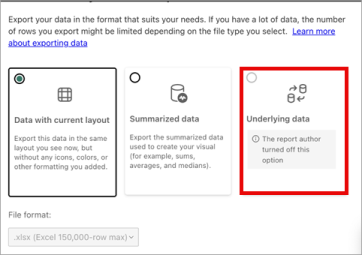
No. Dashboard reporting is designed to provide consistent, business-ready insights. The raw data behind the dashboard insights is often very complex, including system codes, technical identifiers, and unfiltered entries that are difficult to interpret without specialized expertise. It may also contain sensitive or proprietary information.
To ensure clarity and consistency, 84.51° only provide datasets or visualizations that apply standard business rules.
If, however, you do want deeper access, 84.51° offers secure platforms like Collaborative Cloud or Data Direct. These environments allow for controlled exploration of more detailed data while maintaining privacy and compliance with data governance standards.
If you have any questions about Collaborative Cloud or Data Direct, ask your Account Management Team.
Who should I contact if I have questions?
For questions about Campaign eligibility, performance reporting, or participation, contact your Account Management Team.
 Go to
Go to